
Setting up a child’s first "real" phone is a significant milestone. It’s that transitional moment where we move from the controlled environment of a smart-watch or a shared iPad to a device that offers real independence. I recently found myself at this crossroads with my eldest daughter starting Year 7. We wanted a "soft entry" - a way to introduce the phone as a useful tool for communication and safety (in effect a utility) before it becomes a social and digital whirlwind.
However, during this transition, I stumbled upon a discovery that reminded me why our mission at All Families Secure is so vital. While preparing a "hand-me-down" Motorola G14 for my son to use as a spare, I realised that the threat to our children’s digital safety doesn't always come from the dark corners of the web or a suspicious link in a text message. Sometimes, the threat is pre-installed on the device itself.
The "Hand-Me-Down" Shuffle
In our house, we’ve always been pragmatic about tech. When the kids were very young and wanted cameras, I bypassed the flimsy, overpriced "kids' cameras" and bought rugged, cheap Android phones from AliExpress. I locked them down with launchers that only allowed camera access and never even gave them a SIM card. It was a perfect, low-cost solution for a toddler's first "gadget."
As the kids grew, my daughter became the recipient of a SpaceTalk watch, which we found brilliant for school. It’s "just a watch" during school hours and a lifeline when we're caught in traffic running between school campuses. But with high school looming, it was time for the "Big Shuffle." I upgraded my business phone to a Pixel 10 (a necessity for battery life!), handed my Pixel 7 Pro down to my personal line, and prepared the Pixel 6 for my daughter. Somehow this feels familiar.
This Pixel 6 replaces her SpaceTalk watch, but it also replaces another phone. A Motorola G14 that I purchased a few years back. I had configured with a kids launcher so my daughter could only access the phone and text functionality. We would hand it to her if she needed a bit more independence (like weekend sports events) and then collect it back afterwards. All other apps on the phone were invisible.
I locked down the Pixel 6 using AirDroid Parental Control, and I turned my attention to our old Motorola G14. My plan was to have it ready as a spare for my son - something I could pop a SIM into if the watch was charging or if he needed a more robust communication tool for a specific outing.
When the Notifications Start Rolling In
The Motorola G14 had been "hard reset" to factory settings. It was clean, or so I thought. I loaded it up with AirDroid Parental Control and configured it ready for use. Then I placed it in my cabinet, fully expecting it to sit quietly until it was needed.
The next day, my phone started buzzing with notifications from the parental control app. “Your son has installed ...”... “Your son has installed ...”
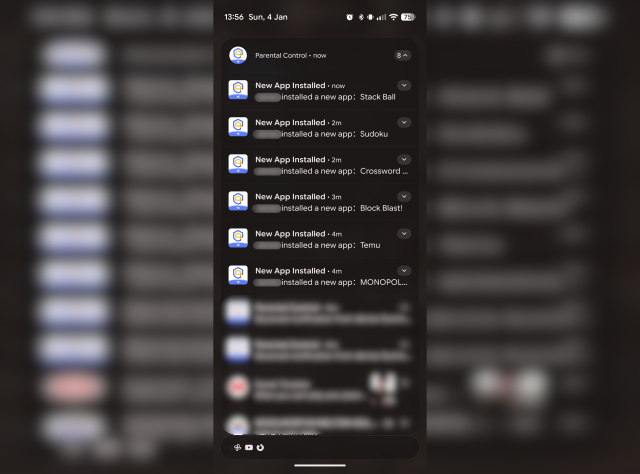
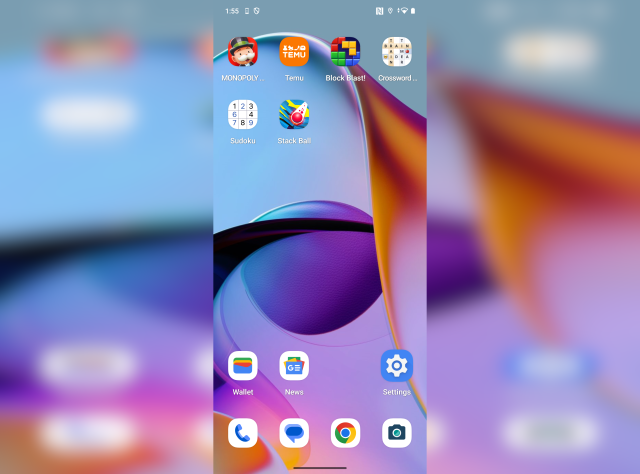
I was confused. The phone was locked in a cabinet. My son didn’t even know it was there. I opened the cabinet, unlocked the device, and there they were: a series of unwanted, unvetted applications that had appeared out of thin air.
I dug into the "App Info" for these new installs, scrolling past the usual data until I found the culprit at the bottom: "App installed from Moto App Manager."
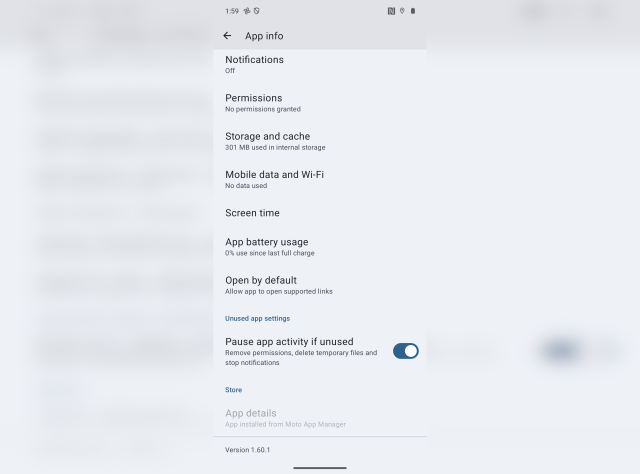
Why "Moto App Manager" is a Family Safety Red Flag
"App Manager" is a friendly name - it sounds like a helpful utility. In reality, this is what's known as "bloatware," and in this context, I consider it effectively malware. This system-level application allows the manufacturer (in this case, Motorola/Lenovo) to remotely push third-party apps onto your device without your explicit consent.
This discovery left me with that same "dirty" feeling you get when Windows 11 pushes a mandatory update that changes your settings or puts things in your Start menu without consent. It’s a violation of device integrity.
If I, as a parent, have gone to the effort of securing a device for my child, I should be the only one with the "keys" to the kingdom.
There are a number of reasons I feel this is a genuinely serious concern:
- Circumventing Parental Consent: It bypasses the "ask to buy" or "permission to install" workflows parents rely on.
- Data Consumption: These apps download in the background, often without reporting their data usage correctly, which can eat into a limited prepaid mobile plan.
- Unvetted Content: You have no control over what kind of apps the manufacturer decides to "partner" with. Today it’s a game; tomorrow it could be something far less appropriate.
- Privacy Intrusion: These apps often come with their own set of tracking permissions that start running the moment they land on the phone.
On the topic of Data Consumption - let's look at the Moto App Manager more closely. Today it installed 6 unwanted applications. I clicked into one of them and it was using ~300MB of storage on the phone, yet Moto App Manager claimed to only have used ~60KB of data for EVERYTHING. For those who aren't familiar with megabytes vs kilobytes etc... 300MB is 5,000 times bigger than 60KB. And that 300MB was for one app, Moto App Manager installed 6 apps while apparently only using 60KB.
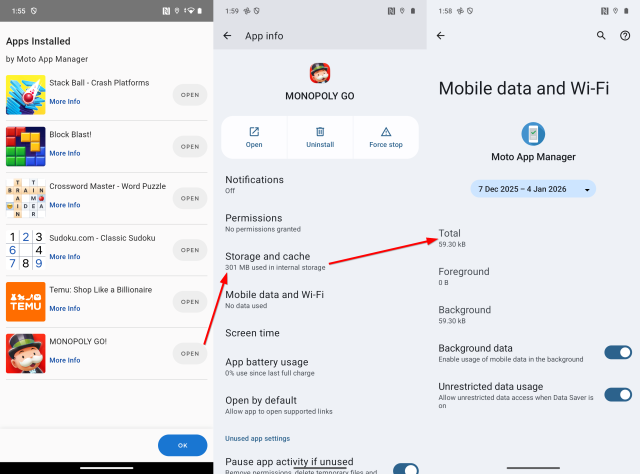
The Android System itself or Moto App Manager. One of these apps is lying or not reporting what it's actually doing. You decide for yourself who's the likely culprit.
How to Protect Your Family’s Devices
A quick search online revealed that I’m far from alone; "Moto App Manager" is a well-documented headache for users globally. Because it is a "system app," you often cannot uninstall it through the standard menus.
If you currently have a Motorola device in your household, your only recourse is to Disable the app. Much like Windows 11 settings that change with every update, this means you hoping Motorola's updates don't re-enable the app.
For now it's disabled, but my trust is forever broken.
When talking to friends and family, my recommendation has changed. In the past, I suggested Motorola as a "cheap and cheerful" entry-level phone for kids. I and my wife have even used them in the past as a great value for money option. Never again. When a manufacturer prioritises advertising revenue from "pushed" apps over the security and integrity of the user's experience - especially a child’s experience - they lose our recommendation permanently.
Choosing Integrity for Your Kids
At All Families Secure, we believe that the technology you bring into your home should work for you, not against you. Your child’s first phone should be a tool for growth and connection, not a billboard for a manufacturer’s latest commercial partner.
When choosing a device for your child, we recommend sticking to "Clean" Android experiences (like the Google Pixel range) or Apple iPhones, where the operating system is less likely to be cluttered with third-party "managers" that compromise your parental controls.
Need help securing your family's digital world?
Book a free consultation with our team today to ensure your family's technology is truly secure.